Introducing Kani: why I'm building my own CapCut in Rust
This is the start of a new project, and probably the most stubborn one I’ve picked up in a while.
I’m writing my own video editor. A clean-room take on CapCut, in Rust, that runs on Linux and Windows, works 100% offline, and is open-source from day one. It’s called Kani now. When I first brought the idea up, it didn’t even have a name yet. It was just “a CapCut alternative for Linux”.
Why I’m doing this
CapCut is the editor I open every single day. And it’s also the one that frustrates me the most.
Right now, my problems with it stand on the following:
- Features I rely on keep getting paygated.
- It’s not on Linux, and CachyOS is my daily driver. So every edit means switching machines.
- It’s unoptimized and janky. Performance drops, memory leaks, random hitches.
- It’s full of AI features I don’t need, and they slow the whole app down.
- It handles projects and updates in a way that’s questionable at best. It ate my entire storage more than once.
So I end up hopping over to a Windows machine just to edit a 3-minute vertical video. That’s not a workflow, that’s a chore.
What actually kicked this off was ArtCraft. Seeing them do clean-room implementations of Adobe and Microsoft apps that are horribly maintained and paygated made me think the same could be done for CapCut. A similar app, written in Rust, would be a lot better for daily usability and stability than what I’m stuck with.
Why Rust?
Stability, mostly. Half of my complaints about CapCut are crashes and leaks, and Rust makes a whole class of those a lot harder to write by accident. It also gives me one codebase for Linux and Windows without dragging a browser engine along for the ride.
The ground rules
Before anything else, I set a few rules that every later decision has to follow.
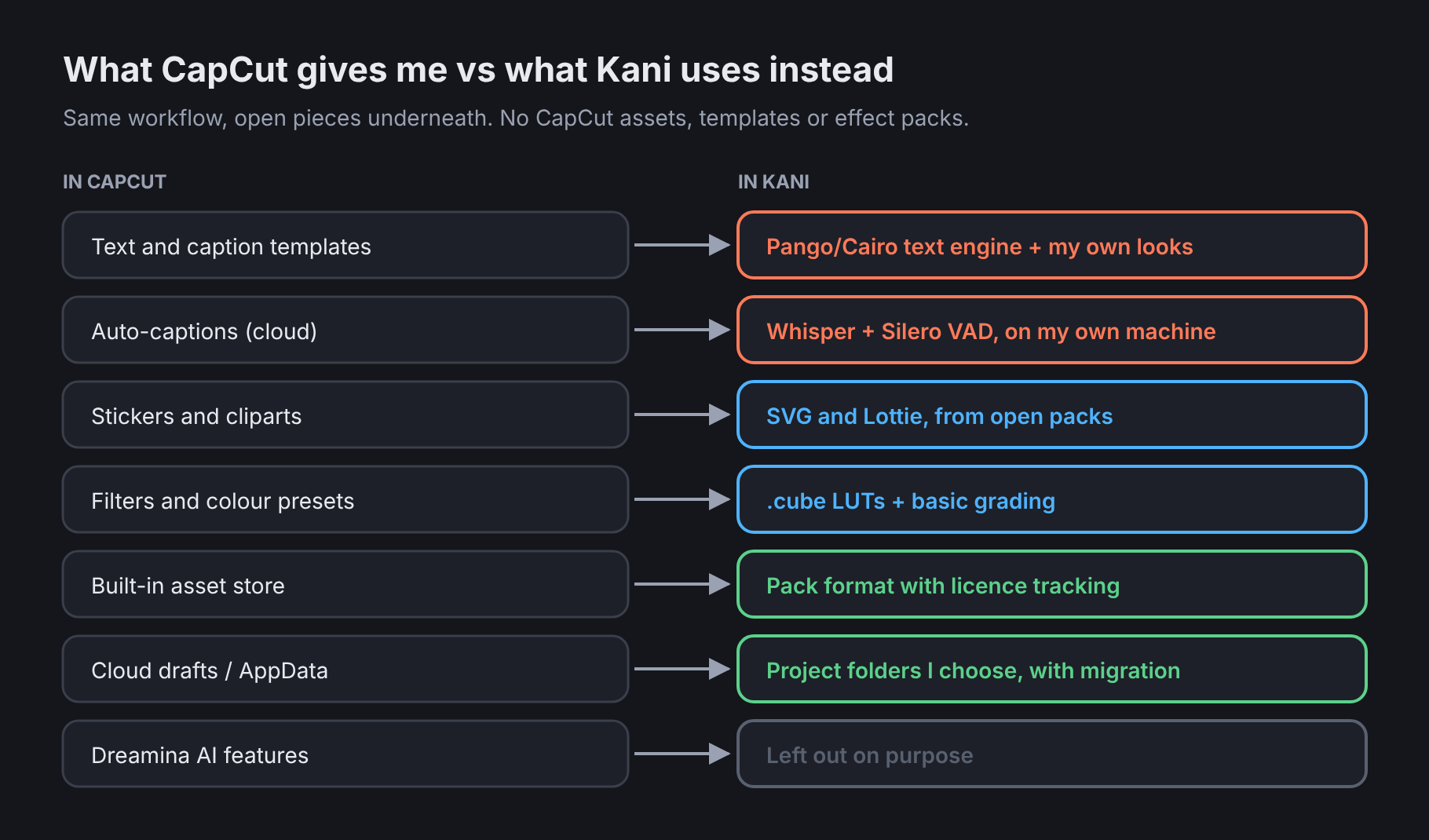
Clean-room, for real. No CapCut branding, no assets, no templates, no effect packs. I’m only copying the workflow I’m used to: the panel layout, the shortcuts, the way things feel under my hands. Everything else gets built from scratch or comes from open-source projects.
The whole workflow, minus Dreamina. Every editing feature I actually use stays. The AI generation stuff doesn’t come along.
Offline and open. No account, no cloud, no “please log in to export”. Open-source, so I can keep adding what CapCut doesn’t have and cutting what it shouldn’t.
My projects, my folders. Projects go where I choose, with a way to move them later. Not buried in AppData where they quietly balloon.
What I use every day
I listed the features I touch daily, in the order they matter to me:
- Text templates and adjustments, caption style templates
- Asset libraries (cliparts and the like)
- LUTs and basic colour grading
- Stickers
That order ended up deciding the order of the whole roadmap later on.
The tricky part is that a lot of CapCut’s features are bespoke. Its templates, its sticker store, its cloud captions. So the first real question was what open-source pieces could stand in for each of them.
Platforms and hardware
The wishlist I gave at the start:
- Linux and Windows first, Mac after that. Installable on both, not just “builds if you squint”.
- GPU support across the board: NVIDIA (CUDA/NVENC), AMD, Intel QuickSync, and Apple Metal eventually. For both the preview and the final render.
- A layout that feels familiar if you’ve used CapCut, so I don’t have to relearn my muscle memory.
- Free transform, morph, skew and deform on text. CapCut never let me do this the way I wanted.
Two machines to test everything on:
| Machine | OS | Role |
|---|---|---|
| Lenovo ThinkPad, i5-1245U + Iris Xe | CachyOS (GNOME, Wayland) | Main dev and test box |
| Dell Precision 3530, i7-8850H + Quadro P600 4 GB | Windows | Windows and NVENC checkpoint |
Before any code, I ran a quick survey on the ThinkPad so I’d know what the hardware could actually do:
vulkaninfo --summary   # Intel Iris Xe (ADL GT2), Mesa, Vulkan 1.4 (+ llvmpipe)
vainfo                 # iHD driver: H.264 / HEVC / VP9 encode + decode, AV1 decode only
ffmpeg -version        # n9.0.2, built with libvpl, nvenc, nvdec, amf, vulkan
Good news overall. Hardware decode and encode on the Intel side, Vulkan available, and a full-featured FFmpeg to compare against.
How I’m building it
I’m pair-building this with Claude. It writes most of the Rust. I’m the one running every build on real hardware, breaking it, sending back logs and screenshots, and deciding where it goes next. I’m calling it vibe-coding, but with a lot of testing behind it.
To keep it from turning into a mess, the work is split into 11 phases, each one tested on the machines above before moving on:
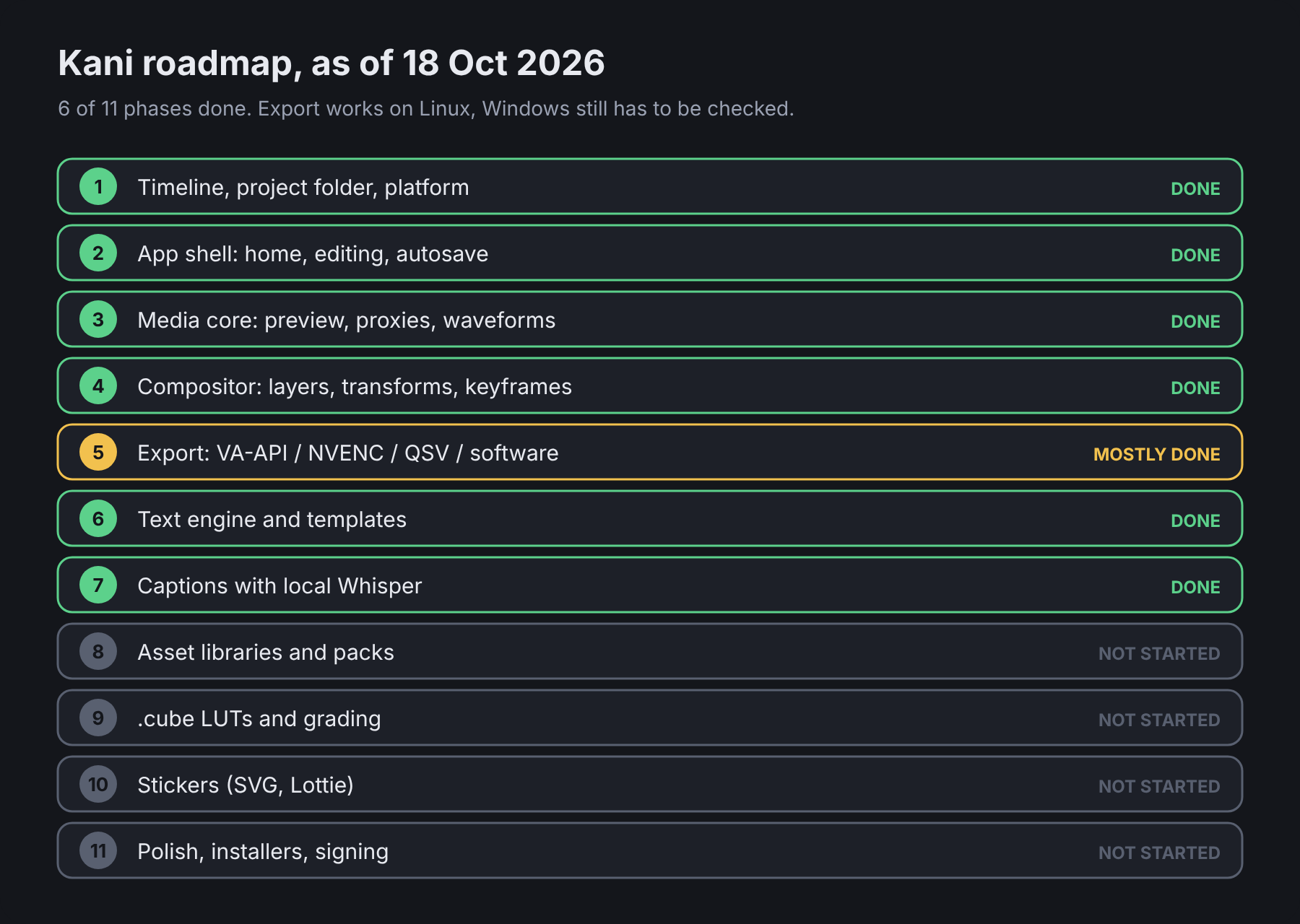
(That picture is how far it’s gotten as I’m writing this up. On day one, every row was grey.)
Versions follow major.phase.iteration. The major number stays at 0 until I say it’s ready for a real release, the middle number is the phase being worked on, and the last one counts builds inside that phase.
The name
Naming this thing took way longer than it should have.
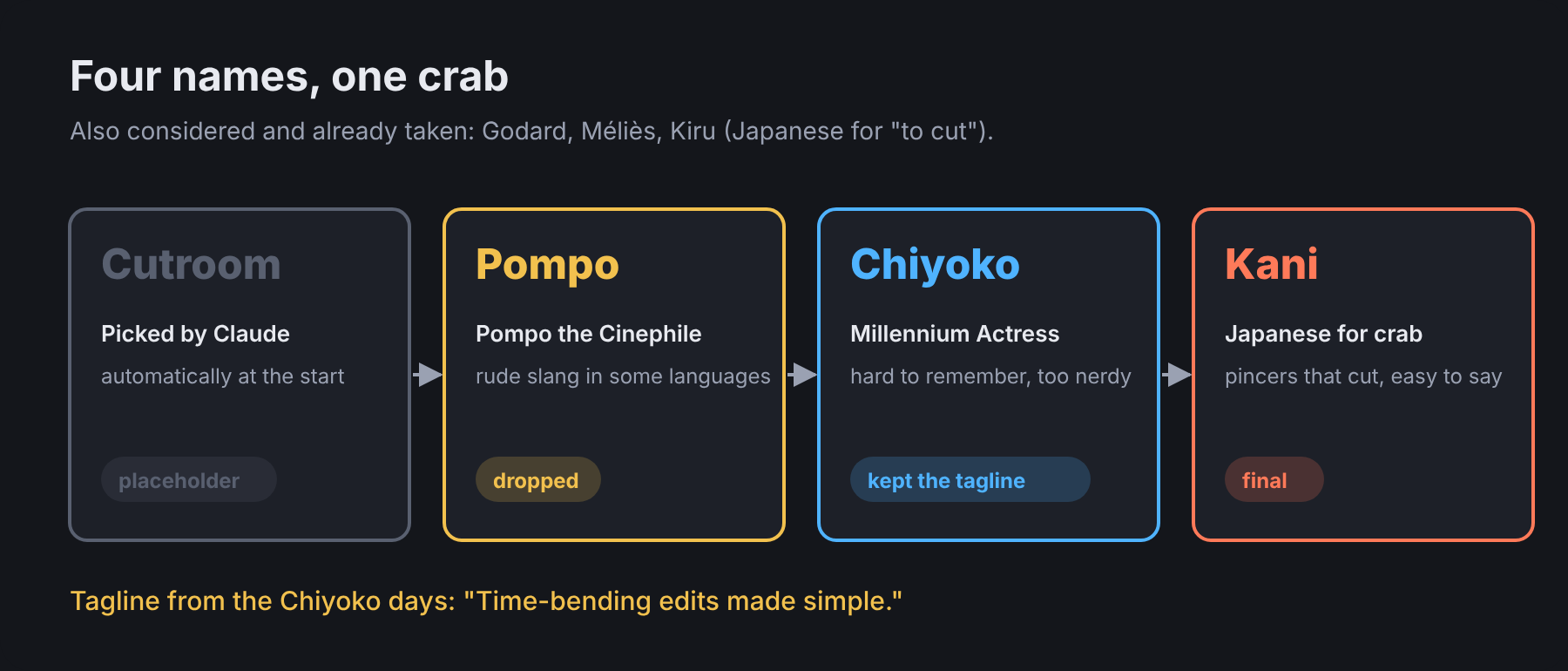
Cutroom was never really a name. It was the placeholder Claude picked automatically when the project started, and it just stuck around while I figured out something better.
My first instinct was film references, or the word “cut” in other languages. Godard and Méliès came to mind right away, and so did Kiru, which is Japanese for “to cut”. All three were already taken. Godard and Méliès were obvious picks, so I wasn’t surprised.
Then I went through movies I love instead:
| Movie | Name I pulled from it |
|---|---|
| Cinema Paradiso | Paradiso |
| Cobweb | Cobweb |
| Pompo the Cinephile | Pompo |
| Perfect Blue | Mima |
| Millennium Actress | Chiyoko |
| Rurouni Kenshin | Battousai |
I settled on Pompo first. I love that movie, and its eccentric, Roger Corman-esque producer heroine goes by that nickname. Unfortunately, a few languages use it as slang with a negative meaning. I didn’t want to pull the same goof Mitsubishi did when they named the Pajero.
So it became Chiyoko, after Millennium Actress. That movie is also where the tagline came from, because of its theme and subject matter:
“Time-bending edits made simple.”
I dropped Chiyoko after a while, though. It’s hard to remember for a lot of people, and honestly a bit too nerdy. The tagline stayed because I just liked it.
In the end I went with animals. My wife pitched Mantis, since they have pincers. Then she thought, why not a crab? I went with the crab. To make it easier to remember, I used Kani, the Japanese word for crab.
Crabs have huge pincers that look like they were made for cutting, and this app is all about editing and cutting. So it all fits.
The next posts go day by day through how it actually got built. First up: Phase 1, and why the first UI got thrown out almost immediately.