Tracks, snapping, caption import, and chasing the silent Windows preview
The morning builds all passed on the ThinkPad, so I kept going. Builds 68, 69 and 70 all landed today, and two more phases got their last loose ends tied up.
Tracks finally behave like tracks
This is the stuff you don’t notice in CapCut until it’s missing.
- The Captions track always stays on top. Even old projects get fixed up when you open them.
- Rename and reorder tracks. Drag a track by its name up or down, right-click for Rename / Move up / Move down, or double-click to rename. All of it undoes properly.
- Drop between tracks to make a new one. While dragging a clip or library media, a thin line shows up between rows and dropping there makes a fresh track right at that spot.
- Video can only go among video tracks and audio among audio, so you can’t end up with a video track buried between two audio ones.
- Dragging a track near the top or bottom edge scrolls the list. I asked for that one after build 68, and it was in by build 69.
Snapping to guides (Phase 6 is done)
Moving the transform box now snaps the picture’s edges and middle to:
- the canvas edges and centre
- any guides you’ve dragged out
- grid lines, when the grid is showing
The line it snapped to lights up pink. It only snaps while the timeline magnet is on, so turning the magnet off gives you free movement again.
That was the last open item for Phase 6. Text, morphing, saved styles and snapping are all confirmed.
Importing caption files (Phase 7)
You can bring in subtitles you already have. .srt, .vtt, .ass and .ssa all work, from an Import caption file… button in the Captions panel or by dropping the file straight in.
They land on the Captions track, not in the media library. Styling markup gets stripped, and the words are spread across each line by length so the word highlighting still works on them. I tried it with real files from my own projects and it lit up the words properly.
Saved text styles got a small fix too. The dropdown now shows which style is applied, and ends with No style (put back the earlier look) in case you change your mind.
Proof that the chip is decoding
I ran the hardware-decoding check from this morning on an AV1 file:
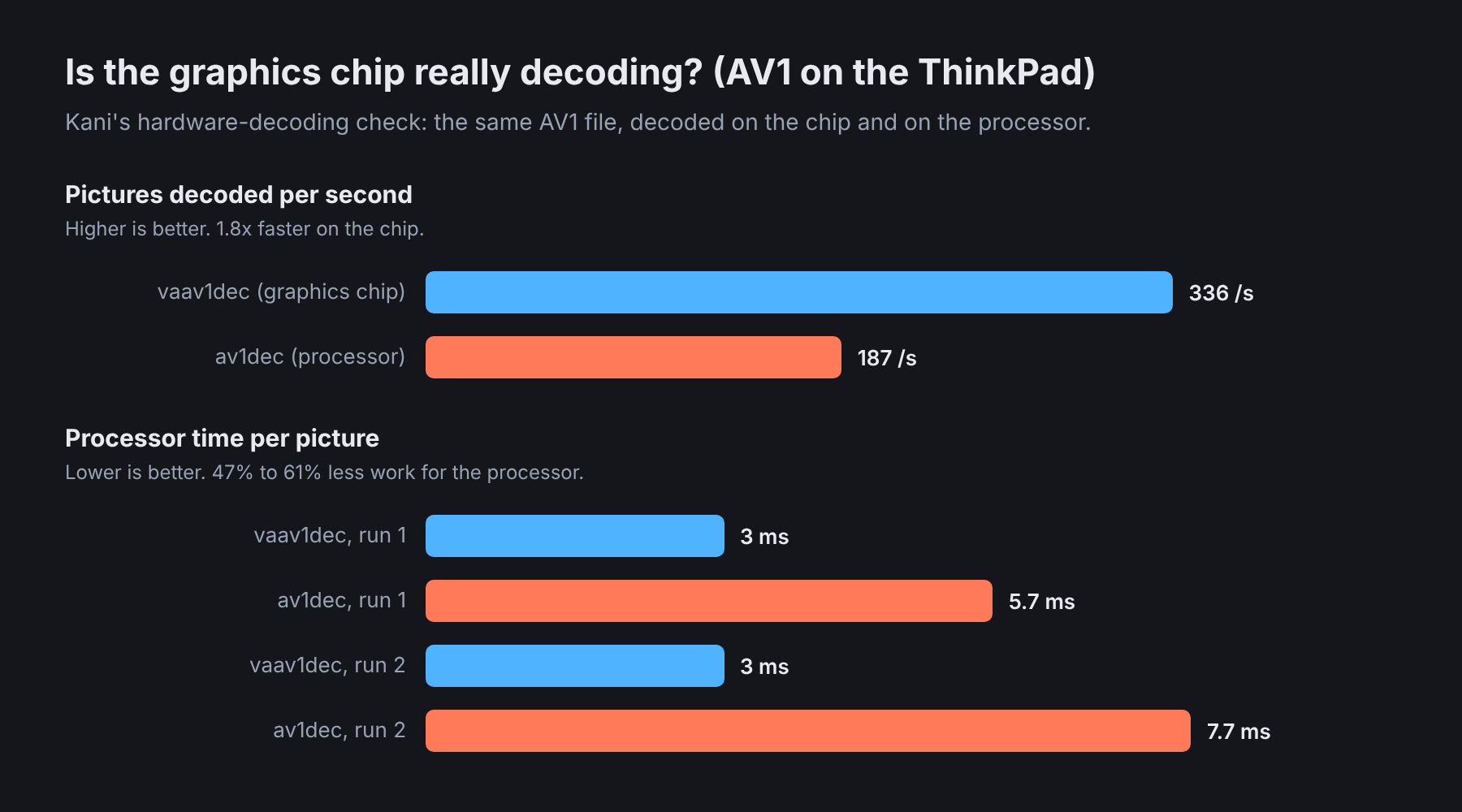
On the graphics chip (vaav1dec), the processor spends about 3 ms per picture. On the processor alone (av1dec) it’s 5.7 to 7.7 ms. So that’s roughly half the CPU work, and nearly twice as many pictures per second.
The preview on the graphics chip also felt evidently smoother after this morning’s change. The console backs it up:
kani: preview on the graphics chip: 488 pictures, 3.7 layers each;
      per picture 2.7 ms uploading and drawing, 2.1 ms reading back; slowest 32.5 ms
That’s Phase 3’s hardware decoding confirmed, at least on the ThinkPad.
One rule for how the UI looks
The app had started to look a bit inconsistent. Every new window picked its own text size and spacing.
So there’s a standing rule now: all text sizes, spacing, button padding and icons follow the media/import panel. It’s written down in docs/UI_STYLE.md, there’s one shared set of values in the code, and anything new has to follow it.
body text 13 px · small 12 px · notes 11 px
gap 6 · tight 4 · padding 8 · dialog padding 14 · icons 16
text buttons 24 px tall, 3x12 padding, 6 px corners
The Replace window and the hardware-check window also got smaller, with fixed sizes and a progress bar. That one also killed a flood of GTK “Trying to measure GtkWindow” warnings that had been filling my console.
The silent Windows preview
This is the one I’ve been putting off since the first Windows run. On the Dell, Kani plays video but no sound, while GStreamer on its own plays sound just fine.
I can’t reproduce it without Windows, but digging through the code turned up the likely culprit. The preview left the choice of sound output entirely to GStreamer. And if anything went wrong with sound, Kani reloaded the clip muted, permanently, and only said so in the status bar. One bad first try on Windows would mute every clip after it.
Build 70 changes that. Kani now picks the sound output itself, in an order per OS, and moves to the next one if it fails:
Windows:  wasapi2sink → wasapisink → directsoundsink → autoaudiosink
macOS:    osxaudiosink → autoaudiosink
Linux:    autoaudiosink → pulsesink → pipewiresink → alsasink

KANI_AUDIO_SINK=<element>  forces one to be tried first
Every playback error now gets printed on the console too, instead of being swallowed:
kani: preview sound goes to wasapi2sink
kani: sound output wasapi2sink failed (...); trying wasapisink
kani: playback error from <element path>: ...
There’s also a Play a test tone button under Settings > Playback, so I can hear right away whether the chosen output works.
I haven’t been able to test this on the Dell yet. So I’m not calling it fixed until I hear sound out of it.
Where things stand
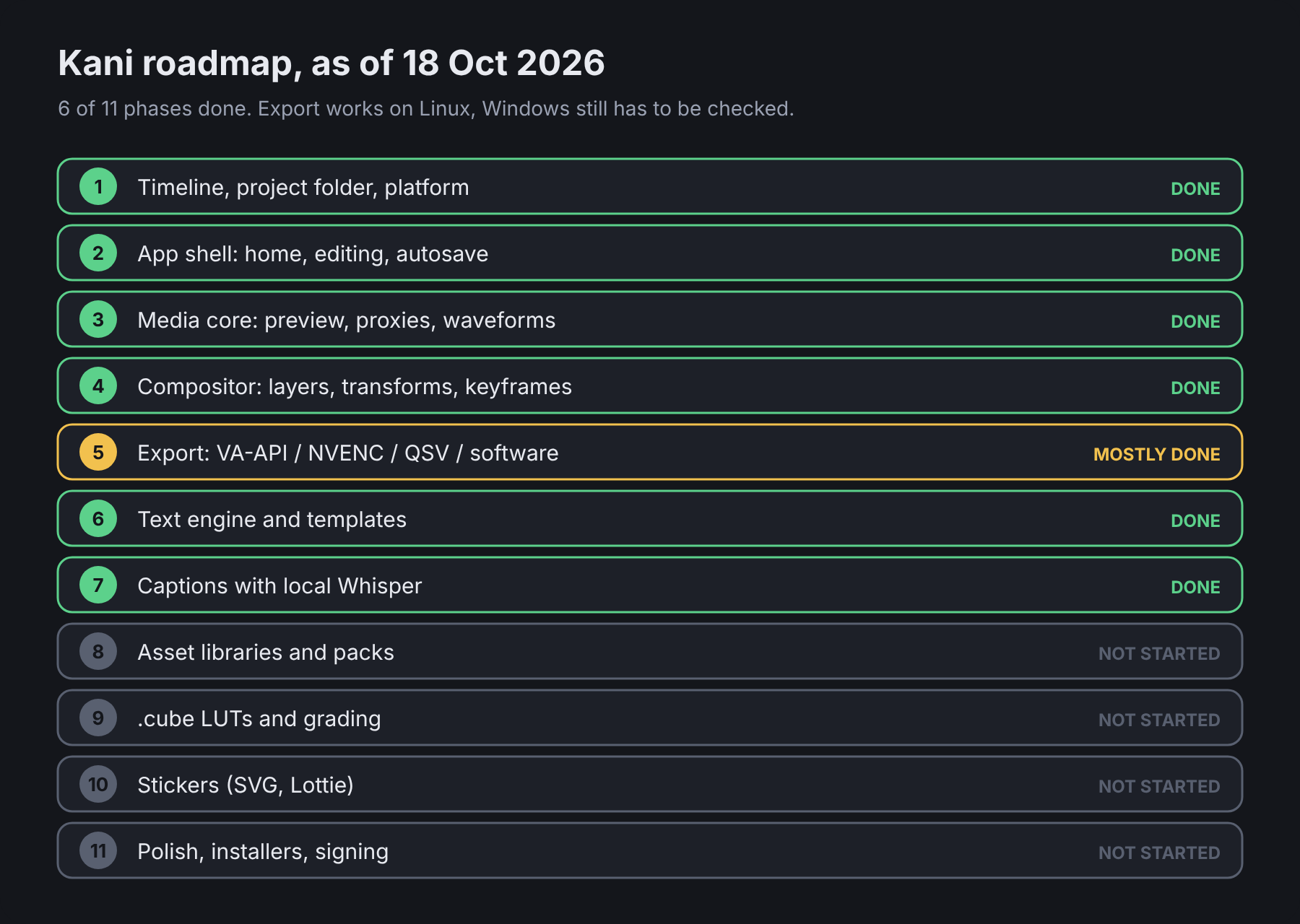
6 of 11 phases done, and Phases 6 and 7 have no open test items left. Export is confirmed on Linux.
What’s still open, honestly:
- Windows sound. Build 70 has to be tried on the Dell, with the console lines and the test tone.
- Drag and drop from Explorer needs a retest on Windows.
- NVENC export on the Dell is still untested. So is GPU compositing on Windows, where it’ll probably fall back to the processor.
- Windows build docs. The MSVC Rust + MSYS2 setup needs writing down properly, and the app should warn when GStreamer has no decoders or no sound output.
- That tiny pause at cuts. Still on the list.
After Windows, it’s Phase 9 (LUTs and grading), Phase 8 (asset libraries) and Phase 10 (stickers), then installers. I’m not starting any of those until the Windows side is sorted.
I guess it won’t hurt having the Dell sitting right next to me for this. I’ll post an update once I’ve actually heard sound out of it.