From 6 minutes to 47 seconds: making Kani's export actually fast
My test project is a real one: 3 minutes 54 seconds, vertical 1080x1920 at 30 fps. Two video clips, an image, generated captions, a bunch of text layers, 7 video tracks, and some layers with skew and perspective on them.
The first full render on the ThinkPad took 6 minutes. For a video that’s not even 4 minutes long.
Here’s where it ended up:
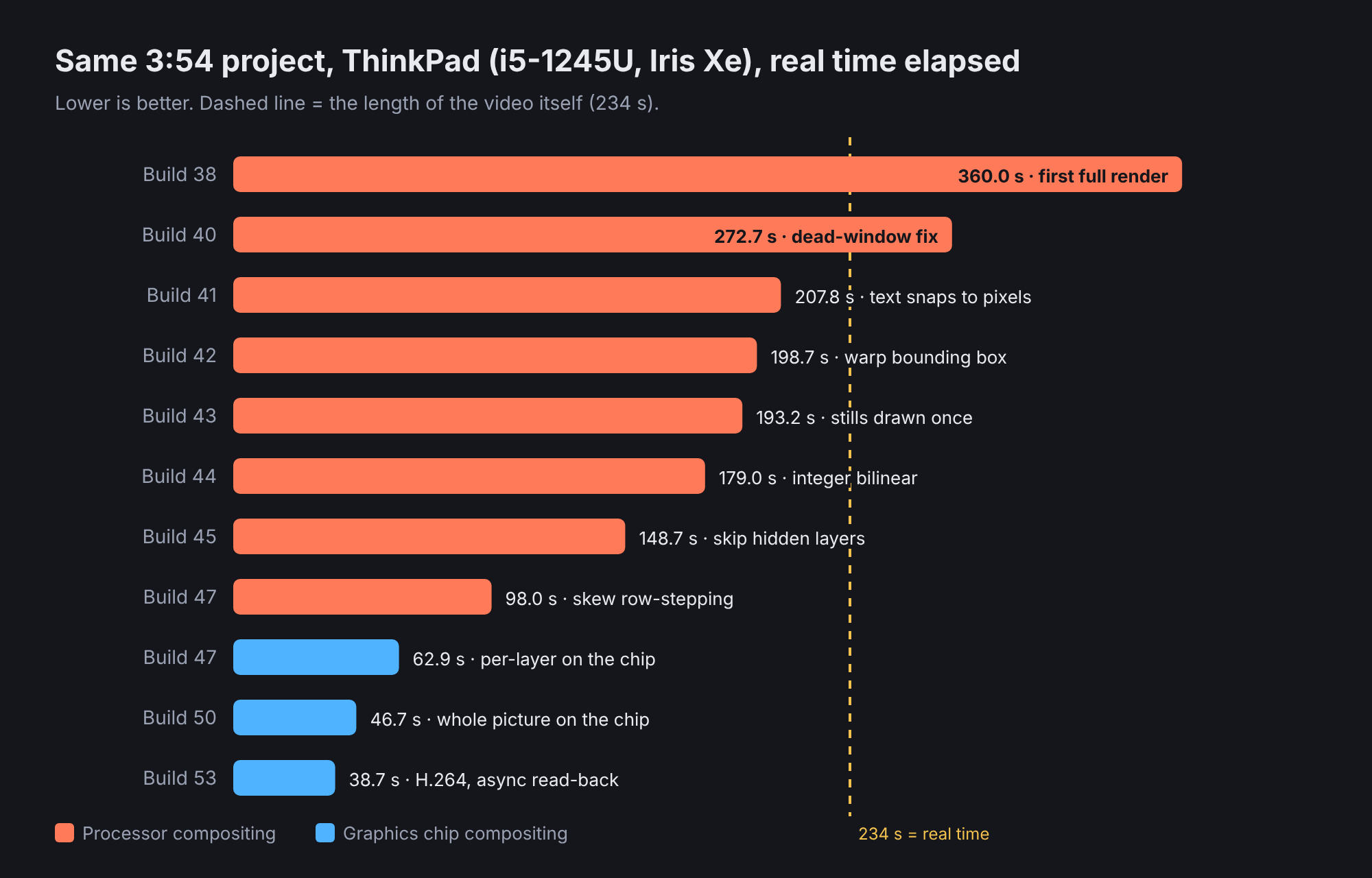
Every number in there is real time elapsed on the same laptop. Kani prints it at the end of every export now, because “it felt faster” isn’t a measurement.
First, find out what’s actually slow
My first guess was the encoder. Wrong.
Build 39 started printing a breakdown, and the result was pretty clear:
kani: exported 234.0 s of video in 272.7 s (0.86x real time) with VA-API (low power);
      waiting for decoded video 19.5 s, compositing 250.3 s, handing to the encoder 0.1 s
The encoder was idling. The decoder was fine. Compositing was eating 250 of the 272 seconds, all on the CPU.
I also asked whether Intel QSV would help, since HandBrake renders with QSV on this exact laptop. It wouldn’t. VA-API already uses the same media engine, and GStreamer on my install doesn’t even have the qsvh264enc element. HandBrake is fast because its whole pipeline stays on the GPU. Mine didn’t.
Squeezing the CPU path
After that I added a per-layer timing table to the end of every export, so each fix could go after whatever was actually at the top.
| Build | Fix | Render |
|---|---|---|
| 41 | Captions sat at y = 652.8 px. That fractional pixel forced the slow path. Text now snaps to whole pixels. | 207.8 s |
| 42 | Skewed/perspective layers only search their own bounding box, not the whole canvas | 198.7 s |
| 43 | Stills and text that don’t change get drawn once and reused | 193.2 s |
| 44 | Integer bilinear sampling for plain scaled video | 179.0 s |
| 45 | Skip layers fully hidden under a solid one, and shrink video inside GStreamer | 148.7 s |
| 47 | Row-stepping for turned and skewed layers | ~98 s |
That build-41 one still makes me laugh. Half a pixel of caption position was costing more than a minute.
Then the graphics chip
The CPU was never going to win against a 1440x1080 video layer with perspective on it. That one layer alone was ~29 ms per frame.
So build 47 added real GPU compositing. Headless EGL with OpenGL ES 3, through glow and khronos-egl, loaded at run time so it can fall back to the CPU if anything’s missing. First version drew each video layer on the chip and read it back: 62.9 s.
Build 50 went all the way. The whole picture lives on the chip. Every layer, video, stills and cached text, gets drawn there, and the finished frame is read back once.
46.7 s for 234 s of video. 5x real time. 2.1x faster than the best CPU run. And the output was virtually the same as the CPU one.
And then async read-back
The biggest leftover was waiting on that one read-back per frame (3.7 ms each). Build 51 uses pixel buffer objects so the chip copies one picture out while it’s already drawing the next:
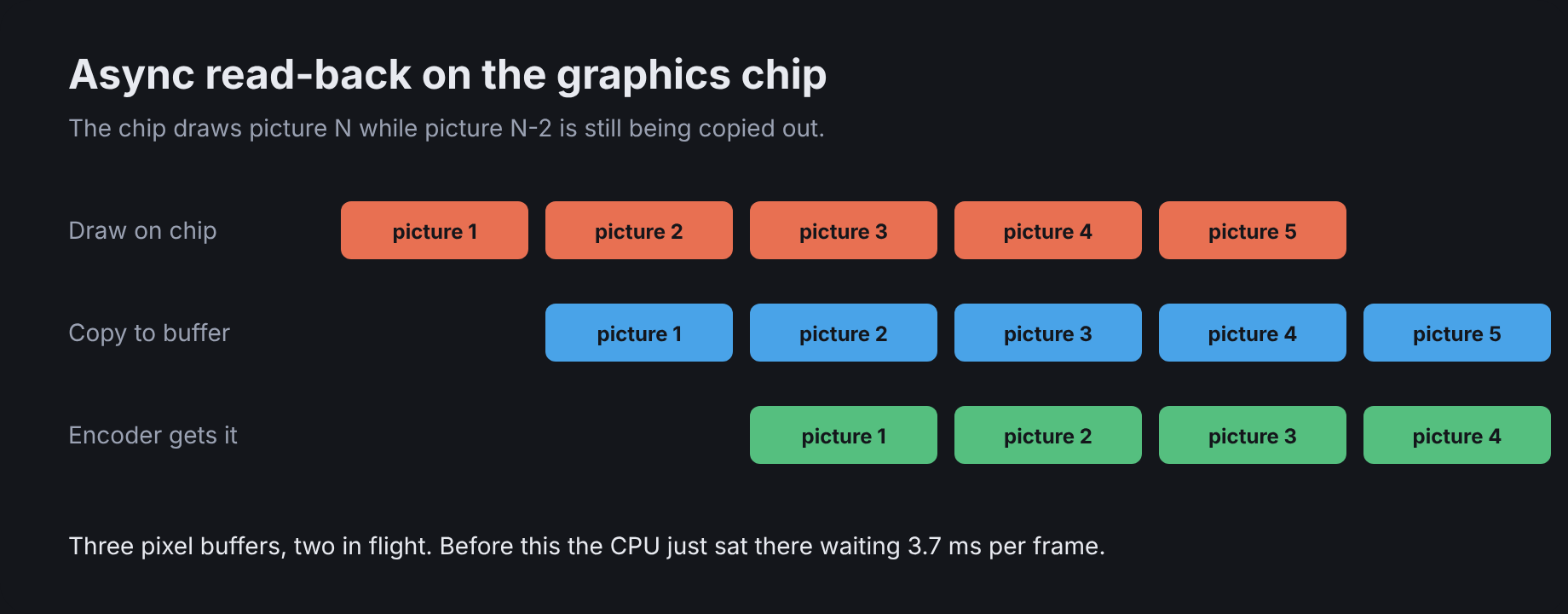
There’s also a proper setting now: Automatic / Always / Never. Automatic only uses the chip if a quick self-test finds a real GPU (not a software renderer like llvmpipe) that’s at least 1.3x faster on whole pictures. It re-checks after every update.
With the later H.264 build, the video part of that same project renders in about 39 seconds on mains power.
From 360 seconds. I’ll take it.